Stage 14 — Automation Testing Deep Dive
Goal: build real, maintainable UI + API automation from scratch — language basics, tool choice, the Page Object Model, locators & waits that don’t flake, data-driven design, CI/CD, and reporting. Stage 8 told you when to automate and why; this chapter is the how, hands-on. I run Playwright suites in production for client platforms and built the MyGP backend framework from zero — this is the distilled version.
🎥 Course preview — Playwright beginner to advanced
AZADEMY course preview: Mastering Playwright for Test Automation — Beginner to Advanced. Open the full playlist on YouTube ↗
Use the video and this chapter together: watch → reproduce the example → improve the test → commit the proof. The chapter is your written lab manual; the playlist is the guided demonstration.
1. The mindset: automation is software
Your test suite is a codebase your team depends on. Flaky, unreadable tests are worse than no tests — they erode trust until people ignore red builds. Treat automation with the same care as production code: version control, code review, naming, DRY, and ruthless flakiness control.
2. The test automation pyramid
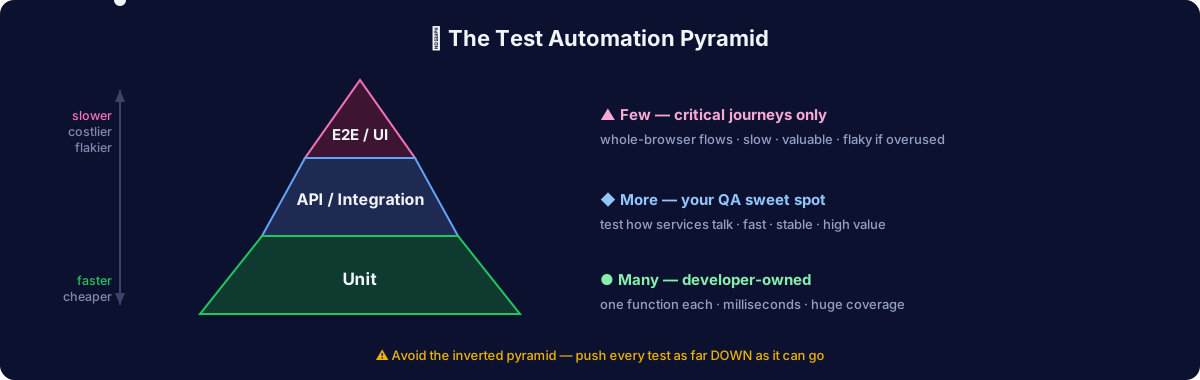
- Unit (base, most): fast, developer-owned, test one function. Milliseconds.
- Integration / API (middle): test how pieces talk — your sweet spot as QA. Seconds. Stable, high value. See Stage 12.
- E2E / UI (top, fewest): test whole user journeys through the browser. Slow, valuable, flaky if overused. Automate only your critical paths here — the rest lives in manual/exploratory.
The #1 automation mistake: an inverted pyramid — hundreds of slow, brittle UI tests and almost no API/unit coverage. Push tests down the pyramid whenever the same logic can be verified at a lower level.
3. Pick one language and stick with it
You need far less programming than you fear: variables, functions, loops, conditionals, arrays/objects, and async/await. Choose based on your stack and job market:
| Language | Pairs with | Learn from |
|---|---|---|
| JavaScript / TypeScript | Playwright, Cypress | freeCodeCamp JS, TS docs |
| Python | Playwright, Selenium, pytest | Python for Everybody |
| Java | Selenium, REST Assured | job-market heavy in enterprise |
My recommendation for a manual tester starting today: TypeScript + Playwright. Modern, less boilerplate, auto-waiting kills most flakiness, and it’s where the industry is moving.
4. Tool landscape (2026)
| Tool | Best for | Notes |
|---|---|---|
| Playwright | Modern web E2E | Auto-wait, multi-browser (Chromium/Firefox/WebKit), trace viewer, codegen, parallel by default. My default. |
| Cypress | Component + E2E, great DX | Time-travel debugger; historically Chromium-focused |
| Selenium | Broadest language/browser support | The veteran; still everywhere in job listings — know the concepts |
| Appium | Mobile (iOS/Android) | Selenium-family for apps |
| REST Assured / Postman+Newman | API automation | Pair with the API chapter |
| AI-assisted | Agentic test authoring & self-healing | Playwright MCP — see Stage 11 |
5. Anatomy of a Playwright test
import { test, expect } from '@playwright/test';

test('member checks out with a valid card', async ({ page }) => {
  await page.goto('/login');
  await page.getByLabel('Email').fill('qa-member-04@example.com');
  await page.getByLabel('Password').fill(process.env.TEST_PW!);
  await page.getByRole('button', { name: 'Sign in' }).click();

  await page.getByRole('link', { name: 'Cart' }).click();
  await page.getByRole('button', { name: 'Checkout' }).click();
  await page.getByRole('button', { name: 'Pay' }).click();

  await expect(page.getByText(/order confirmed/i)).toBeVisible();
  await expect(page).toHaveURL(/\/order\/\d+/);
});
Notice: role- and label-based locators, not brittle CSS/XPath. Playwright auto-waits for elements — no manual sleeps.
6. Locators & waits — where flakiness lives and dies
Locator priority (most to least robust):
- Accessible role + name:
getByRole('button', {name: 'Pay'}) - Label / placeholder / text:
getByLabel,getByText - Test IDs:
getByTestId('checkout-pay')— ask devs to adddata-testid - CSS — only when nothing better exists
- ❌ XPath by position (
//div[3]/span[2]) — breaks on any layout change
Waiting — the golden rule: never sleep().
- ❌
await page.waitForTimeout(3000)— either too slow or too flaky - ✅ Wait for a condition: element visible, network idle, URL changed, response received. Playwright/Cypress do this automatically via web-first assertions.
7. The Page Object Model (POM)
Separate what a page can do from what a test checks. When the UI changes, you fix one file, not fifty tests.
// pages/CheckoutPage.ts
export class CheckoutPage {
  constructor(private page: Page) {}
  pay = () => this.page.getByRole('button', { name: 'Pay' }).click();
  confirmation = () => this.page.getByText(/order confirmed/i);
}

// test
const checkout = new CheckoutPage(page);
await checkout.pay();
await expect(checkout.confirmation()).toBeVisible();
Keep assertions in tests, actions in page objects. Add fixtures/factories for reusable setup (logged-in state, seeded data).
8. Data-driven testing
Run the same test across many inputs — your EP/BVA tables become a data table:
const cases = [
  { card: '4242424242424242', expect: 'confirmed' },
  { card: '4000000000000002', expect: 'declined' },
  { card: '4000000000000069', expect: 'expired'  },
];
for (const c of cases) {
  test(`checkout with ${c.card} → ${c.expect}`, async ({ page }) => { /* ... */ });
}
9. CI/CD — tests that run themselves
Automation nobody runs is theater. Wire it into GitHub Actions so it runs on every push/PR:
name: e2e
on: [push, pull_request]
jobs:
  test:
    runs-on: ubuntu-latest
    steps:
      - uses: actions/checkout@v4
      - uses: actions/setup-node@v4
        with: { node-version: 20 }
      - run: npm ci
      - run: npx playwright install --with-deps
      - run: npx playwright test
      - uses: actions/upload-artifact@v4
        if: always()
        with: { name: playwright-report, path: playwright-report/ }
“My tests run automatically on every PR and block merges on failure” is a career-defining sentence in interviews.
10. Reporting & debugging
- Playwright Trace Viewer — a full timeline with DOM snapshots, network, and console for every step. The single best debugging tool in web automation.
- Allure / built-in HTML reporter — shareable results with screenshots + videos on failure. Configure
screenshot: 'only-on-failure'andtrace: 'on-first-retry'. - Retries + quarantine — set 1–2 retries for known-flaky externalities, but investigate every retry; a suite that only passes on retry is lying to you.
11. Framework architecture (what “senior” looks like)
tests/            # specs — readable, assertion-focused
pages/            # page objects — actions & locators
fixtures/         # auth state, test users, seeded data
utils/            # api helpers, data generators
data/             # test data files (json/csv)
playwright.config # envs, projects (browsers), reporters, retries
.github/workflows # CI
Principles: independent tests (any order, no shared state), fresh data per run (create + clean up), env-driven config (no hardcoded URLs/creds), parallel-safe.
12. The flakiness checklist
When a test flakes, it’s almost always one of these:
- A hard sleep instead of a condition wait
- A race on data (another test/user changed shared state — isolate it)
- Animation/transition not settled (wait for the end state, not a timer)
- Locator matching two elements (tighten it)
- Network timing (mock it, or wait for the response)
- Test order dependence (make each test self-contained)
13. Your first automation portfolio project
Automate the top 8–10 regression cases from your manual portfolio against saucedemo.com:
- Playwright + TypeScript, POM structure, data-driven where it fits
- Running in GitHub Actions on every push, with the HTML report uploaded as an artifact
- A README explaining what you automated and why (and what you deliberately left manual)
That repo — real, running, green — beats any certificate.
✅ Exercise
- Install Playwright (
npm init playwright@latest), runnpx playwright codegen saucedemo.com, and record a login — then rewrite the generated test with role-based locators and a page object - Add a data-driven login test: valid, locked-out, and wrong-password users
- Push it to GitHub with the Actions workflow above and watch it run green
Next → Stage 15: Performance Testing